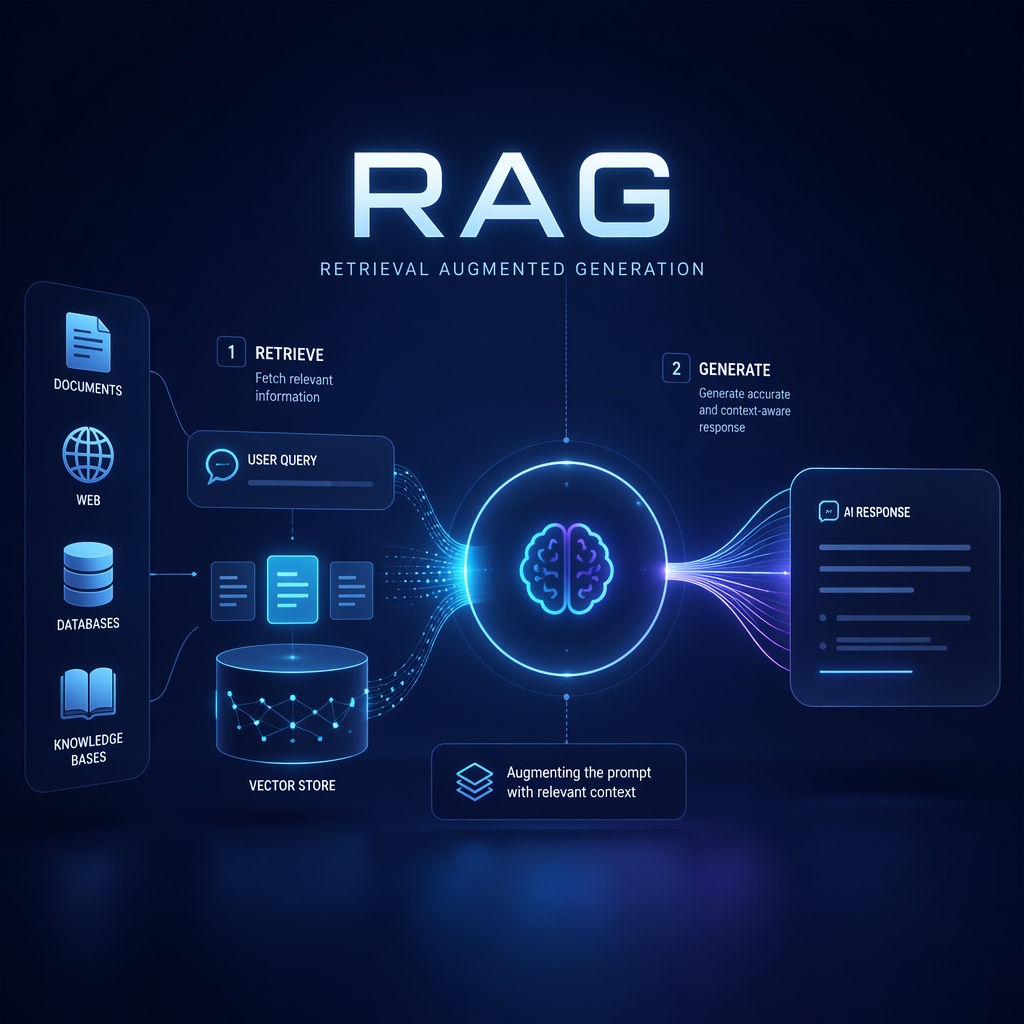
Loading RAG Data into a Vector Database: Architecture, Python Workflow, and Common Pitfalls
Retrieval-augmented generation (RAG) often looks simple in demos: take documents, create embeddings, store them in a vector database, and retrieve relevant chunks at question time. In production, that “data loading” step is where many systems quietly succeed or fail.
If your ingestion pipeline is weak, your chatbot returns stale answers, misses critical context, or becomes too expensive to operate. If it is designed well, the same large language model can answer with grounded, up-to-date information from your product docs, support knowledge base, contracts, or internal engineering runbooks. This article explains how RAG data loading into a vector database actually works in a real engineering workflow, including architecture, Python implementation, tradeoffs, deployment concerns, and common mistakes.
Why data loading matters in RAG
A vector database is only as useful as the data pipeline feeding it. Teams often focus on model choice, but retrieval quality is heavily determined by upstream decisions:
- Which source systems are ingested
- How documents are cleaned and normalized
- How text is chunked
- Which embedding model is used
- What metadata is stored
- How updates, deletes, and versioning are handled
Consider a practical use case: a SaaS company wants an internal support assistant that answers questions from product documentation, troubleshooting guides, incident postmortems, and release notes. The business goal is to reduce support escalations and shorten onboarding for new support engineers. In this setting, retrieval must be accurate, recent, and auditable. A poor ingestion design can surface deprecated procedures or lose context across chunk boundaries. That is not just a technical issue; it becomes a product reliability issue.
What “loading data into a vector database” means
In a RAG system, data loading is the pipeline that converts raw source content into searchable vector records. At a high level, the process is:
- Extract content from source systems
- Clean and normalize the text
- Split documents into chunks
- Generate embeddings for each chunk
- Store vectors plus metadata in a vector database
- Keep the index updated as source content changes
Each stored record usually contains:
- A unique chunk ID
- The chunk text
- An embedding vector
- Metadata such as document title, source URL, product area, timestamp, access level, and version
At query time, the application embeds the user’s question, searches the vector database for similar chunks, optionally applies metadata filters, and sends the retrieved context to the LLM.
Production architecture for RAG ingestion
A realistic RAG data-loading architecture has more moving parts than a notebook script. It typically includes source connectors, document processing, embedding generation, indexing, and monitoring.
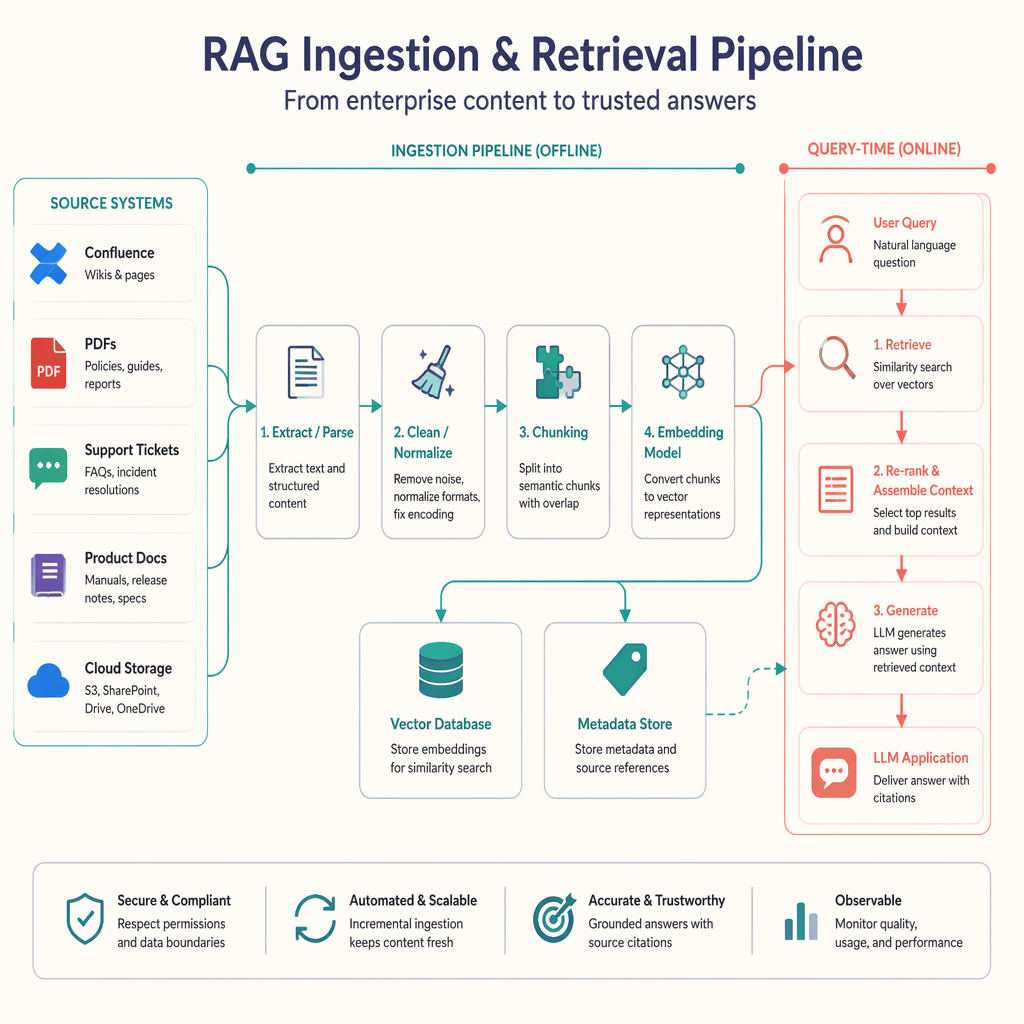
Core components
1. Source systems
These are the business systems holding your content:
- Documentation platforms
- PDF repositories
- Internal wikis
- Ticketing systems
- Databases
- Object storage
The important design question is not just connectivity, but trust. Some sources are authoritative; others are noisy. You may want to ingest only approved content or attach quality metadata that can later influence retrieval or ranking.
2. Document extraction and parsing
Raw files are rarely model-ready. PDFs may contain headers, footers, and broken line wraps. HTML may include navigation noise. Ticket exports may contain signatures and timestamps that are irrelevant to retrieval.
This stage should normalize documents into a consistent internal schema, for example:
{
  "document_id": "kb-123",
  "title": "Resetting SSO for enterprise tenants",
  "source": "confluence",
  "url": "https://...",
  "updated_at": "2026-04-15T10:00:00Z",
  "text": "full cleaned text here"
}
3. Chunking
Chunking is where a document becomes retrieval units. A single 20-page document is too large for precise similarity search, so it is split into smaller segments.
Common chunking strategies include:
- Fixed-size chunks by characters or tokens
- Sliding-window chunks with overlap
- Structure-aware chunking using headings, sections, or paragraphs
Chunking is not trivial. If chunks are too small, context is lost. If too large, retrieval becomes fuzzy and expensive. For support documentation, structure-aware chunking often performs better because procedures and caveats tend to align with headings.
4. Embedding generation
Each chunk is converted into a dense vector using an embedding model. This model must be stable and suitable for your domain. Swapping models later is possible, but it usually requires full re-embedding and reindexing.
5. Vector database
The vector database stores embeddings and metadata, and supports nearest-neighbor search. Some teams use managed databases such as Pinecone, Weaviate Cloud, or MongoDB Atlas Vector Search. Others use PostgreSQL with pgvector when they want operational simplicity and stronger transactional control.
6. Metadata store and indexing state
In production, you also need bookkeeping:
- Document versions
- Ingestion timestamps
- Processing status
- Checksum or content hash
- Delete tombstones
- Access control metadata
This enables incremental sync instead of reloading the entire corpus every night.
Data flow considerations
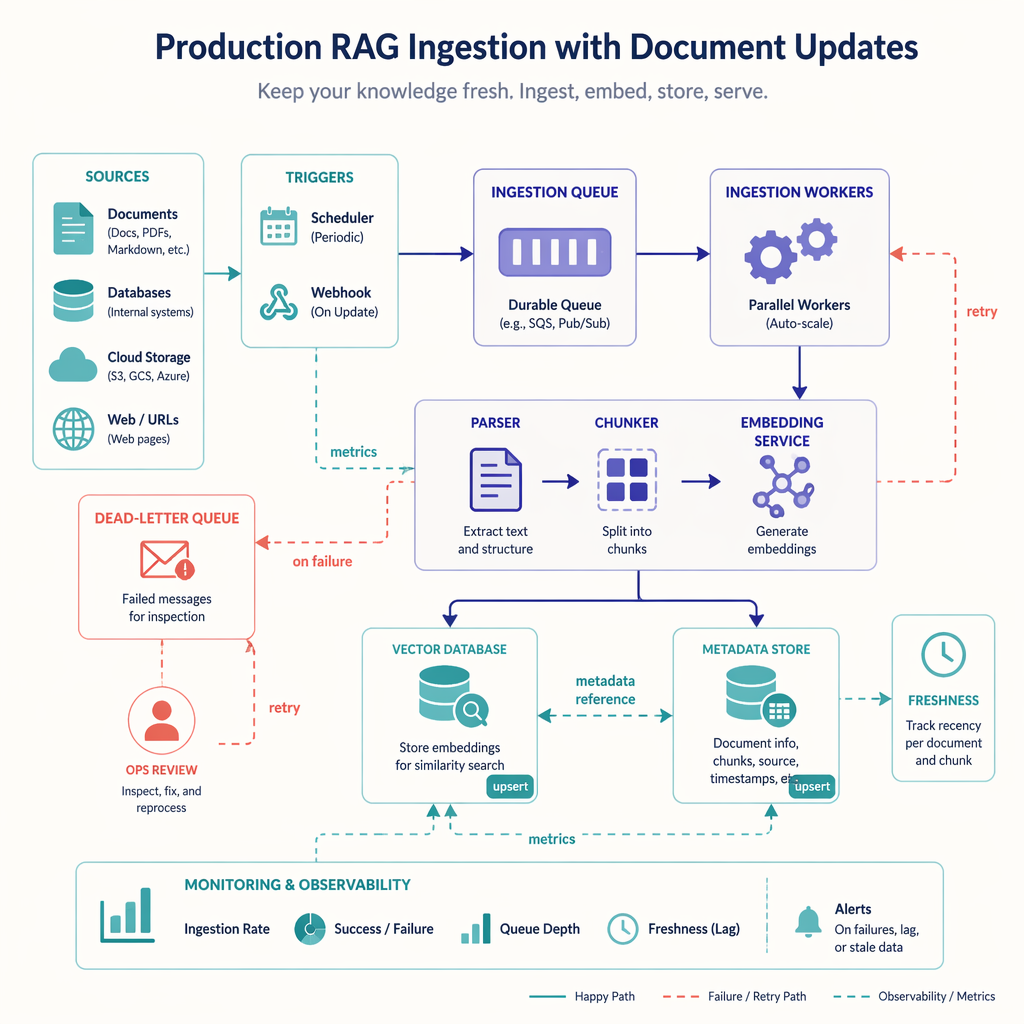
A practical ingestion workflow is usually asynchronous:
- A scheduler or webhook detects new or updated documents
- Documents are queued for processing
- Workers parse, chunk, embed, and upsert records
- Failures are retried with dead-letter handling
- Metrics track throughput, latency, and index freshness
That design is more robust than a single batch script. It also supports scale as your corpus grows from hundreds to millions of chunks.
Python example: loading documents into a vector database
Below is a realistic Python example using OpenAI embeddings and ChromaDB for local development. Chroma is a practical choice for demos and prototypes; in production, the same pipeline concepts apply to other vector databases.
Install dependencies
pip install chromadb openai tiktoken pypdf python-dotenv
Example pipeline
import os
import hashlib
from typing import List, Dict
from dotenv import load_dotenv

import chromadb
from openai import OpenAI
from pypdf import PdfReader

load_dotenv()

client = OpenAI(api_key=os.environ["OPENAI_API_KEY"])

chroma_client = chromadb.PersistentClient(path="./chroma_store")
collection = chroma_client.get_or_create_collection(name="support_kb")


def read_pdf_text(file_path: str) -> str:
    reader = PdfReader(file_path)
    pages = []
    for page in reader.pages:
        text = page.extract_text() or ""
        pages.append(text)
    return "\n".join(pages)


def clean_text(text: str) -> str:
    lines = [line.strip() for line in text.splitlines()]
    lines = [line for line in lines if line]
    return "\n".join(lines)


def chunk_text(text: str, chunk_size: int = 800, overlap: int = 120) -> List[str]:
    chunks = []
    start = 0
    while start < len(text):
        end = start + chunk_size
        chunks.append(text[start:end])
        start += chunk_size - overlap
    return chunks


def embed_texts(texts: List[str]) -> List[List[float]]:
    response = client.embeddings.create(
        model="text-embedding-3-small",
        input=texts
    )
    return [item.embedding for item in response.data]


def stable_id(doc_id: str, chunk_index: int, chunk_text: str) -> str:
    digest = hashlib.sha256(chunk_text.encode("utf-8")).hexdigest()[:12]
    return f"{doc_id}-chunk-{chunk_index}-{digest}"


def index_document(file_path: str, doc_id: str, title: str, source_url: str) -> None:
    raw_text = read_pdf_text(file_path)
    cleaned = clean_text(raw_text)
    chunks = chunk_text(cleaned)

    embeddings = embed_texts(chunks)

    ids = []
    metadatas = []
    documents = []

    for i, chunk in enumerate(chunks):
        chunk_id = stable_id(doc_id, i, chunk)
        ids.append(chunk_id)
        documents.append(chunk)
        metadatas.append({
            "document_id": doc_id,
            "title": title,
            "source_url": source_url,
            "chunk_index": i,
            "source_type": "pdf"
        })

    collection.upsert(
        ids=ids,
        documents=documents,
        embeddings=embeddings,
        metadatas=metadatas
    )


if __name__ == "__main__":
    index_document(
        file_path="docs/sso_reset_guide.pdf",
        doc_id="kb-123",
        title="Resetting SSO for enterprise tenants",
        source_url="https://internal.example.com/kb/sso-reset"
    )
    print("Document indexed successfully.")
This script shows the core ingestion path: extract text from a PDF, clean it, chunk it, embed each chunk, and upsert into a persistent vector store.
A few lines matter more than they appear:
chunk_text()uses overlap so key context is not cut off at chunk boundaries.stable_id()creates deterministic chunk IDs, which helps with updates and deduplication.metadatasstores business context that can later be used for filtering, display, and debugging.upsert()is preferable to naive insert logic because it supports re-indexing without duplicate records.
Example query workflow
To complete the picture, here is how the application would retrieve chunks at question time:
def search(query: str, top_k: int = 3) -> Dict:
    query_embedding = embed_texts([query])[0]
    results = collection.query(
        query_embeddings=[query_embedding],
        n_results=top_k
    )
    return results


if __name__ == "__main__":
    results = search("How do I reset SSO for an enterprise customer?")
    for i, doc in enumerate(results["documents"][0]):
        metadata = results["metadatas"][0][i]
        print(f"\nResult {i + 1}")
        print("Title:", metadata["title"])
        print("Source:", metadata["source_url"])
        print("Chunk:", doc[:400])
In a real application, these retrieved chunks would be inserted into the prompt for the LLM, often along with citations.
Architecture decisions and tradeoffs
The right ingestion design depends on product needs, not just technical taste.
Managed vector DB vs self-hosted
| Option | Strengths | Tradeoffs |
|---|---|---|
| Managed vector DB | Fast setup, scaling, operational support | Higher cost, vendor lock-in, less control |
| PostgreSQL + pgvector | Familiar ops, transactional consistency, simpler stack | May require more tuning at scale |
| Local/dev store like Chroma | Excellent for prototyping, simple setup | Not ideal as the final answer for large production workloads |
The takeaway is that your database choice should align with your operating model. A small team shipping an internal assistant may prefer pgvector for simplicity. A product with high retrieval volume and multi-region requirements may benefit from a managed service.
Batch ingestion vs event-driven sync
Batch jobs are simple, but they create stale windows. Event-driven updates improve freshness but require queueing, retry logic, and idempotency. If your content changes frequently, such as knowledge base articles or policy docs, event-driven sync is usually worth it.
Chunk size tradeoffs
Chunk size directly affects retrieval precision and LLM context efficiency.
- Smaller chunks improve specificity
- Larger chunks preserve more context
- Overlap reduces boundary issues but increases storage and indexing cost
In practice, many teams start with 300 to 800 tokens per chunk and evaluate retrieval quality before tuning further. There is no universal best number.
Common mistakes when loading RAG data
Many production issues are caused by ingestion shortcuts rather than retrieval algorithms.
1. Treating extraction as trivial
Raw PDFs and HTML often contain noisy text that degrades embedding quality. Headers, sidebars, page numbers, and duplicated navigation links can dominate similarity search if not removed.
The lesson is simple: parsing quality is retrieval quality.
2. Ignoring metadata
Storing only vectors and text is a missed opportunity. Metadata enables filtering by:
- Product version
- Region
- Team
- Access level
- Document freshness
- Source type
Without metadata, you may retrieve irrelevant or unauthorized content.
3. No strategy for updates and deletes
Teams often load data once and forget lifecycle management. But documents change, move, or get deleted. If stale chunks remain in the index, the assistant will continue citing them.
Use content hashes, deterministic IDs, and deletion handling from the start.
4. Chunking without structure
Blind character-based chunking can split tables, procedures, or definitions in the middle. For docs with clear headings, structure-aware chunking often yields better retrieval than raw fixed windows.
5. Embedding everything with no quality gate
Not every source belongs in your retrieval index. Low-signal content such as casual chat logs or duplicate ticket threads can pollute results. Some content should be excluded, summarized, or routed to a separate collection.
6. Forgetting security boundaries
In enterprise settings, access control matters. If HR documents and engineering docs share one index without proper metadata filters, retrieval can leak sensitive content.
7. No measurement of ingestion quality
A successful pipeline is not just “documents indexed.” You should track:
- Parse success rate
- Chunk count per document
- Embedding failures
- Index freshness lag
- Duplicate chunk ratio
- Retrieval hit quality on test queries
After a list like this, the key takeaway is that ingestion is a product surface, not just a backend script. If you do not design for quality, freshness, and safety, users will feel it immediately in answer quality.
Deployment concerns in the real world
The jump from prototype to production usually exposes operational questions that were hidden during local testing.
Incremental indexing
Re-embedding the full corpus on every run is expensive. A better pattern is to compare source content hashes and only reprocess changed documents.
Rate limits and cost control
Embedding APIs have both latency and cost. To manage them:
- Batch embedding requests where supported
- Skip unchanged chunks
- Cache results during retries
- Use smaller embedding models when accuracy is acceptable
Observability
You need enough logging and metrics to answer questions like:
- Why did yesterday’s sync fail for 8% of documents?
- Which parser produced empty text?
- Which source created duplicate chunks?
- How stale is the vector index relative to the source of truth?
Multi-tenancy
If your application serves multiple customers, decide early whether to use:
- One shared index with tenant metadata filters
- Separate collections or namespaces per tenant
Shared indexes are simpler and cheaper, but they increase the importance of correct filtering and security checks.
Reindexing strategy
Eventually you may change your chunking approach, metadata schema, or embedding model. Plan for full reindexing as a normal maintenance operation, not an emergency.
A practical implementation checklist
If you are building a RAG ingestion pipeline for a real product, this is a sensible engineering checklist:
- Define authoritative data sources
- Normalize documents into a stable schema
- Remove parser noise before chunking
- Choose chunking based on document structure
- Store rich metadata for filtering and debugging
- Use deterministic IDs and content hashes
- Support upserts and deletes
- Monitor ingestion quality and freshness
- Test retrieval using real user questions
- Plan for reindexing when models or schema change
The value of this checklist is not ceremony. It helps ensure that your assistant answers from the right information, with enough context, at acceptable cost.
Conclusion
Loading data into a vector database is the foundation of a reliable RAG system. The technical steps are straightforward on paper, but production quality depends on architecture choices around parsing, chunking, metadata, lifecycle management, and monitoring. In a real business setting, those decisions determine whether your assistant becomes a trusted workflow tool or an unreliable demo.
Start with a clean ingestion pipeline, not just a powerful model. If your data is well-structured, current, and searchable, the rest of the RAG stack gets dramatically better.
Related Topics
Related Resources
The Future is Collaborative: Building Multi-Agent RAG Systems with Gemini and LangGraph in 2026
Explore the cutting edge of AI-driven information retrieval with Multi-Agent RAG systems. Learn how specialized AI agents collaborate using Google Gemini and LangGraph to deliver more accurate, comprehensive, and contextually-aware responses to complex queries.
videoSemantic Search and Retrieval-Augmented Generation (RAG)
Unlock the power of Semantic Search and Retrieval-Augmented Generation (RAG) using Generative AI. Learn how modern AI systems extract information, improve accuracy, and deliver truly contextual responses.
articleAgentic AI - Complete Guide
The blog gives you complete inderstanding of AI Agents